Showing posts with label review. Show all posts
Showing posts with label review. Show all posts
Wednesday, December 7, 2011
Samsung Galaxy Notes Video review: why you'll love almost as much as an iPhone
In the end I could not resist. I fund my first Android device and I chose the new Samsung Galaxy Notes. Since you've ventured IOS and I did this step with a little 'skeptical but I admit that, by using it, I'm falling in love with this smartphone.Notes The Samsung Galaxy has a great screen, it is huge, lets you surf the Internet and use your favorite applications by providing a user experience

Friday, April 15, 2011
Western Digital's My Book Studio Edition II
 It's a great time to be in the market for mass storage for your Mac. Hardware manufacturers keep coming out with new solutions that either provide more speed (like SSDs) or greater capacity, and the prices keep coming down.
Western Digital is now shipping the My Book Studio Edition II, a two-drive enclosure filled with 6 TB (that's right, six terabytes) of RAID 0 storage and a quad-interface (FW800 / FW400 /eSata / USB2.0) for only US$549.99. That price is quite amazing, since the competing LaCie 4 Quadra array sells for almost $400 more. The My Book Studio Edition II takes advantage of WD's 3 TB Caviar Green drives, two of which are nestled into an enclosure. The product comes with a power adapter usable in the US, Canada and most European countries, FireWire 800 and USB cables, a FireWire 800/400 cable and a CD containing a user manual and a selection of software.
The My Book Studio Edition II drive comes pre-formatted for Mac OS X and can be reformatted for use with Windows 7. While the array comes set up as a 6 TB RAID 0 stripe set, it's possible to use it as a mirrored pair (RAID 1) of 3 TB drives. For those who are looking for redundant storage, the RAID 1 solution makes a lot of sense. If it's raw storage capacity that you want, RAID 0 is the way you'll want to go -- just be sure to buy a second array for backup purposes.
To see how the My Book Studio Edition II array stood up during our tests, turn to the next page.
Build Quality
To build a $550 RAID 0 array, something had to give, and in my opinion it's in the build quality of the My Book Studio Edition II. While other array providers use metal cases, WD chose to use silver-colored plastic.
When I tried to open the top of the array to see how the drives were arranged, I ran into my first issue. The user manual, which I chose to download from Western Digital's website instead of pulling off of the CD, showed that to pop open the top of the array I just needed to push down on the top front cover with my thumb until it sprung a latch and the cover popped up. I had to supply a tremendous amount of force before I was able to get the latch to release.
The individual 3 TB drives are held securely in the case in a pair of metal adapters topped with a small cover plate held in by a thumb screw. Removing the cover plate gives you access to the drives, which have a plastic tab attached to them for removal. Other arrays tested by TUAW in the past used a spring-type mechanism that popped the drive out after pushing in on the drive or moving a handle. My concern with the plastic tabs is that they seem flimsy and could easily rip off if pulled with enough force.
After pulling out the drives and replacing them, I found it almost impossible to get the plastic cover to latch properly and I needed to apply a lot of pressure to stay closed. Western Digital should consider replacing this hinge-and-latch cover with a slide off top cover or some other means of accessing the drives.
The array features Western Digital's trademark glowing white stripe on the front. When the array is busy, the stripe is animated. What I find disconcerting is that the stripe occasionally "blinks," even when nothing seems to be happening. For some reason, it seemed to draw my attention to the drive since I was wondering what was going on. Installing Western Digital's Drive Manager application enabled a capacity meter function with the stripe, turning it into a visual indication of how much capacity is being used.
The My Book Studio Edition II is surprisingly quiet, which is nice in an office environment. It also stayed quite cool during testing.
Software
The CD that comes with the My Book Studio Edition II comes with documentation and three apps: WD Drive Manager, WD Anywhere Backup and WD +TURBO Installer. I could find nothing in the documentation about the +TURBO Installer, so I took a chance and double-clicked the installer icon. What I found is that this appears to be a WD-specific IEEE 1394 (FireWire) driver. Installation requires a reboot of your Mac. Tests were performed both with and without the +TURBO feature enabled, and it appeared to improve performance slightly.
Performance
While other drives usually show rotation speed in the specifications, there is no published speed for the Caviar Green drives. They use something called Intellipower to minimize power usage by the drive, which Western Digital refers to as "a fine-tuned balance of spin speed, transfer rate, and caching algorithms designed to deliver both significant power savings and solid performance."
As usual, and I'm sure I'll catch flak for this in the comments, my testing was done with a FireWire 800 connection. Unless a kindly reader would like to purchase me a Mac with an eSATA card, my future reviews of devices of this type will all be done with FireWire 800. If Apple comes out with a Thunderbolt-equipped iMac this year, I might consider getting one of those for testing.
That being said, our tests consist of copying a large file of known size to and from the drive or drive array, as well as duplicating a file on the drive. This is repeated to eliminate timing errors. We've been able to gather timing statistics on a number of drives, so the tests give a good indication of relative speed between similar products. Here are the results for several other drives and arrays compared with the My Book Studio Edition II:
Write file to drive
OWC Pro Dual mini SSD (RAID 0, FW 800): 26.3 seconds
WiebeTech RTX220-QR (RAID 1, FW 800): 26.1 seconds
WiebeTech RTX220-QR (RAID 0, FW 800): 26.0 seconds
WiebeTech RTX220-QR (RAID 0, FW 800): 25.5 seconds (cache flushing enabled)
CRU-DataPort ToughTech Duo QR (RAID 1, FW 800): 25.5 seconds
CRU-DataPort ToughTech Duo QR (RAID 0, FW 800): 26.1 seconds
WD My Book Studio Edition II (RAID 0, FW 800): 31.1 seconds
WD My Book Studio Edition II (RAID 0, FW 800, +TURBO): 28.6 seconds
WD My Book Studio Edition II (RAID 1, FW 800): 34.2 seconds
OWC Pro Dual mini SSD (RAID 0, FW 800): 26.3 seconds
WiebeTech RTX220-QR (RAID 1, FW 800): 26.1 seconds
WiebeTech RTX220-QR (RAID 0, FW 800): 26.0 seconds
WiebeTech RTX220-QR (RAID 0, FW 800): 25.5 seconds (cache flushing enabled)
CRU-DataPort ToughTech Duo QR (RAID 1, FW 800): 25.5 seconds
CRU-DataPort ToughTech Duo QR (RAID 0, FW 800): 26.1 seconds
WD My Book Studio Edition II (RAID 0, FW 800): 31.1 seconds
WD My Book Studio Edition II (RAID 0, FW 800, +TURBO): 28.6 seconds
WD My Book Studio Edition II (RAID 1, FW 800): 34.2 seconds
Read file from drive
OWC Pro Dual mini SSD (RAID 0, FW 800): 20.7 seconds
WiebeTech RTX220-QR (RAID 1, FW 800): 21.3 seconds
WiebeTech RTX220-QR (RAID 0, FW 800): 22.3 seconds
WiebeTech RTX220-QR (RAID 0, FW 800): 21.1 seconds (cache flushing enabled)
CRU-DataPort ToughTech Duo QR (RAID 1, FW 800): 22.5 seconds
CRU-DataPort ToughTech Duo QR (RAID 0, FW 800): 22.2 seconds
WD My Book Studio Edition II (RAID 0, FW 800): 22.0 seconds
WD My Book Studio Edition II (RAID 0, FW 800, +TURBO): 20.5 seconds
WD My Book Studio Edition II (RAID 1, FW 800): 23.1 seconds
OWC Pro Dual mini SSD (RAID 0, FW 800): 20.7 seconds
WiebeTech RTX220-QR (RAID 1, FW 800): 21.3 seconds
WiebeTech RTX220-QR (RAID 0, FW 800): 22.3 seconds
WiebeTech RTX220-QR (RAID 0, FW 800): 21.1 seconds (cache flushing enabled)
CRU-DataPort ToughTech Duo QR (RAID 1, FW 800): 22.5 seconds
CRU-DataPort ToughTech Duo QR (RAID 0, FW 800): 22.2 seconds
WD My Book Studio Edition II (RAID 0, FW 800): 22.0 seconds
WD My Book Studio Edition II (RAID 0, FW 800, +TURBO): 20.5 seconds
WD My Book Studio Edition II (RAID 1, FW 800): 23.1 seconds
Duplicate file on drive
OWC Pro Dual mini SSD (RAID 0, FW 800): 46.6 seconds
WiebeTech RTX220-QR (RAID 1, FW 800): 50.4 seconds
WiebeTech RTX220-QR (RAID 0, FW 800): 45.2 seconds
WiebeTech RTX220-QR (RAID 0, FW 800): 45.2 seconds (cache flushing enabled)
CRU-DataPort ToughTech Duo QR (RAID 1, FW 800): 44.9 seconds
CRU-DataPort ToughTech Duo QR (RAID 0, FW 800): 58.1 seconds
WD My Book Studio Edition II (RAID 0, FW 800): 61.7 seconds
WD My Book Studio Edition II (RAID 0, FW 800, +TURBO): 56.8 seconds
WD My Book Studio Edition II (RAID 1, FW 800): 59.8 seconds
OWC Pro Dual mini SSD (RAID 0, FW 800): 46.6 seconds
WiebeTech RTX220-QR (RAID 1, FW 800): 50.4 seconds
WiebeTech RTX220-QR (RAID 0, FW 800): 45.2 seconds
WiebeTech RTX220-QR (RAID 0, FW 800): 45.2 seconds (cache flushing enabled)
CRU-DataPort ToughTech Duo QR (RAID 1, FW 800): 44.9 seconds
CRU-DataPort ToughTech Duo QR (RAID 0, FW 800): 58.1 seconds
WD My Book Studio Edition II (RAID 0, FW 800): 61.7 seconds
WD My Book Studio Edition II (RAID 0, FW 800, +TURBO): 56.8 seconds
WD My Book Studio Edition II (RAID 1, FW 800): 59.8 seconds
As you can see from the read test results, the WD My Book Studio Edition II array with the +TURBO mode enabled in a RAID 0 configuration was the fastest FireWire 800 drive we've tested so far. It wasn't by much, just 0.2 seconds, but that's still not bad for a "cheap" drive array. In the write test, the array came out in the middle of the pack with +TURBO enabled, and the array lagged behind all other drives or arrays tested in the duplicate test.
Conclusion
Probably the most amazing feature of the Western Digital My Book Studio Edition II 6 TB array is the price. Even if it's being used as a RAID 0 mirrored array with 3 TB of capacity, the $550 price point is incredible for what it delivers.
While those who are looking for a fast drive array for video editing will probably want to look elsewhere (probably towards the new Thunderbolt arrays that are starting to appear), the My Book Studio Edition II array is definitely worth a look from anyone who is searching for an inexpensive mass storage solution.
[VIA]
Thursday, April 7, 2011


Tuesday, April 5, 2011
App review | SPB Shell 3D for Android

As you can see above, the highlight of the show here is a cool-looking 3D carousel for switching between up to 16 panels, and you can trigger it by either tapping or horizontally dragging the bottom-center button. Whilst in carousel mode, you can also rearrange the panels, change their colors, or flick away excess panels. All of this required no manual reading on our end, so it's safe to say that this is a pretty intuitive app. Read on to see what the performance is like.


We've been playing with Shell 3D on our Xperia Play, Nexus S, and Dell Venue for a few days, and we're still surprised by its butter-like smoothness -- SPB claims that the app is rendered consistently at 60fps on most modern Android devices. The only time we see this app hiccup is when we throw in the Pictures panel (for displaying Flickr's pictures of the day), so while this feature is a nice touch, we tend to keep it tucked away for minimal irritation. Other than that, we enjoy casually spinning the carousel or flicking between the panels for the subtle 3D transition effect, without significantly affecting battery life as well.
As for the app list, it's simply a vertical scrolling list with springy effects when you hit the top or bottom, but there's also a nice addition here: apps that already have a shortcut added to a panel are marked with a little home icon. That said, there's another side to this: for some reason, SPB decided that we shouldn't be allowed to add the same shortcut to multiple panels, which can be annoying for those who want maximum accessibility to the most frequently used shortcuts. For an app costing $14.95, this shouldn't be too much to ask for, right? But otherwise, Shell 3D is a pretty neat add-on for those looking to breathe new life into their Android phones.

Sunday, April 3, 2011
Motorola Citrus (Verizon)

This week end only, VerizonWireless is charity a mid-range
The Verizon Motorola Citrus is a compact Android 2.1 Eclair smartphone that host's a Backtrack navigation pad on the rear and a 3-inch 320 x 240 px resolution, 262K color QVGA TFT Capacitive Touchscreen. You can customize up to 7 home screens and easily compose with the Virtual QWERTY Swype Keyboard. Access the web with the HTML Webkit Browser at 3G high data speed and Wi-Fi 802.11 b/g connectivity. The Motorola Citrus let's you make Skype calls. Use Bing Search or Google Search by voice when you need to find some info. With the Motorola Citrus you can read your email, send / receive Instant Messages and stay social.
Motorola xoom hands on
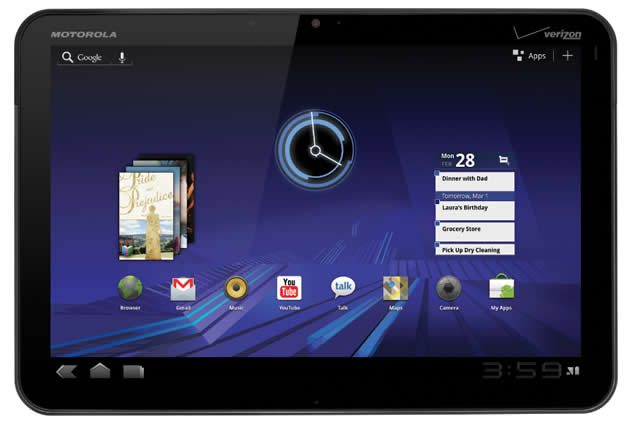
On January 5th at CES 2011,Verizon Wireless and Motorola unveiled
The Verizon Motorola Xoom enters the Tablet market as the first device powered by the Android 3.0 Honeycomb operating system. Featuring a 10.1-in WXGA Touch screen, portrait and landscape virtual QWERTY keyboards and 1GHz Dual Core Processor, the Motorola Xoom is ready to meet your mobile productivity and entertainment demands.
RIM BlackBerry Storm 2 9550 Review

BlackBerry Storm2 9550Phone (Verizon Wireless)
Faster and upgraded operating system the Verizon BlackBerry Storm2 returns to manage your life when on the move via fingertip navigation. The Verizon BlackBerry Storm2 features a 3.25 in 480 x 360 px 65k color touch screen with enhanced Surepress technology.
Saturday, April 2, 2011
HTC Arrive review
Though it was teased late last year -- on the same day that HTC announced its very first Windows Phone 7 devices, in fact -- the company's QWERTY-packing 7 Pro has taken its sweet time to make it to American airwaves; in the process, it's gone through a name change and picked up the first big platform update from Microsoft. The phone we now know as the Arrive is finally available from Sprint,
Sony Ericsson Xperia Play review
The PlayStation Phone. We've had quite the intimate history with this gamepad-equipped slider, learning of its secretive existence way back in August and then handling a prototype unit in January, so you'll forgive us for feeling sentimental and still entertaining our pet name for it. The Sony Ericsson marketing gurus renamed it the Xperia Play when it finally went official at MWC this year, but
Verizon iPhone review
The Verizon iPhone 4 is an interesting product to review. Firstly, it's not exactly a new device (not in any outwardly noticeable way). From design, down to its CPU, RAM, and even cost, this iPhone is the same as the AT&T model... save for that one small but really important thing: it's got a CDMA radio inside. The device is also somewhat tricky to review based on its software, since we've all
iPad 2 review
To say Apple's iPad 2 is an easy tablet to review is somewhat of an understatement. The device, a follow up to last year's wildly successful (and currently market-defining) iPad, is nearly identical when it comes to software, and though improved, closely related on the hardware side as well. With a 9.7-inch, 1024 x 768 display, the general size and shape of the device has remained the same, and
Friday, April 1, 2011
Samsung Series 9 (NP900X3A) laptop review


Look and feel

But, of course, the first thing everybody notices about the 9 is its insanely thin profile. Yes, it's one reallythin and light machine, and in terms of numbers, it comes extremely close to rivaling the MacBook Air. Samsung claims the Series 9 weighs 2.88 pounds and measures 0.62 to 0.64-inches thick. In comparison, the Air tips the scales to 2.9 pounds and is 0.11-inches at its thinnest point and 0.68 at its thickest. Still, the differences are as minimal in person as they are on paper -- while the Series 9 does seem slightly thicker in hand, it's really not a difference you'd notice everyday, and just like the Air, picking it up off your lap or table requires little to no muscle.
Samsung was able to find a home for quite a few ports on the svelte system as well. The left port cover pulls down to reveal one USB 3.0 port, a mini HDMI socket, and a jack for the included Ethernet adapter. The one on the right hides a USB port 2.0, a microSD card slot, and a 3.5mm headphone jack. It's a decent lineup, we just wish Samsung had gone with a regular SD card slot. Oh, and those worried that the port covers would retract when the system is sitting on the table will be happy to know that it isn't an issue.
Keyboard and touchpad

The touchpad -- or what Samsung is calling a SuperButton ClickPad -- has integrated mouse buttons, and it's actually the best we've seen on a shipping Windows laptop. It's still not a perfect experience, but it does use Synaptics' ClickPad Series 3 design with image sensing technology, so using the traditional finger layout – a thumb on a mouse button and an index finger to navigate – is noticeably improved. Additionally, the 4.0 x 3.0-inch matte pad, which has a rubberish feel to it, is also quite spacious and lends itself nicely to multi-finger movements. However, two finger scrolling is still where things aren't exactly perfect – running two fingers down the pad while on this very site still made for a very jittery experience, though adding a bit more pressure helped move things along. However, some other gestures work as advertised – four fingers down brings you to the desktop and four up launches Aero. You can always customize the gestures, though for some reason, the menu for that is buried deep in the Control Panel's mouse settings tab.
The touchpad and keyboard provide hassle-free experiences on their own, but we found in our typical use, that our palms would swipe up against the pad while typing and would subsequently cause the cursor to jump across the screen. Making some adjustments to our wrist positioning helped ease the situation as did turning off the touchpad, but it's something we wish either Samsung or Synaptics would address with some palm rejection tweaks.
Screen

Samsung claims wide 160-degree viewing angles with the 9, and we can attest that both horizontal and vertical angles on this thing were top notch. Actually, horizontal angles are almost perfect; sitting to the far right of the system, we were still able to make out everything on the panel. It's indeed impressive. The 1.3 megapixel HD webcam above the display served up decently crisp images of our mug while chatting over Skype, though it seemed to have a slight issue adjusting the brightness as we moved around. The two speakers, which are located on the right and left edge, were surprisingly loud for their size. Unsurprisingly, the sound was rather tinny when listening to Adele's latest on Rdio.
Performance and graphics

But don't underestimate the role of the 128GB SSD in launching apps and quickly resuming / booting Windows 7 Home Premium. Similar to what Apple's done with its MacBook Air, Samsung's worked on what it's calling Power Back, which promises to wake the system from sleep in three seconds. And our testing proved that claim to be exactly on the mark. The Air, on the other hand, resumes from sleep in a slightly faster 2.6 seconds, though the Series 9 has Apple's system beat on boot time -- it revved up Windows 7 Home Premium in 20 seconds flat, while our 13-inch Air took 25 seconds.
Graphics-wise, the Series 9 packs Intel's integrated HD 3000 graphics, and as we saw with the Lenovo ThinkPad X220, the performance is markedly improved over the last Core integrated options. It had no problems handling the local and Flash HD clips we threw at it. How does it compare to the NVIDIA's GeForce 320M in the Air? Well, as the benchmarks show, NVIDIA's option is still a stronger choice, but like we said, Intel's solution was extremely nimble when it came to watching 1080p clips.
| PCMarkVantage | 3DMark06 | Battery Life | |
| Samsung Series 9 (Core i5-2537M) | 7582 | 2240 | 4:20 |
| 13-inch MacBook Air (Core 2 Duo, GeForce 320M) | 5170 | 4643 | 4:45 |
| ThinkPad X220 (Core i5-2520M) | 7635 | 3517 | 7:19 |
| ASUS U36Jc (Core i5 / NVIDIA GeForce 310M) | 5981 | 2048 / 3524 | 5:30 |
| Lenovo IdeaPad U260 (Core i5) | 3858 | 1153 | 2:56 |
| Dell Vostro V13 (Core 2 Duo) | 2687 | 556 | 2:39 |
| Toshiba Portege R705 (Core i3-350M) | 5024 | 1739 / 3686 | 4:25 |
| HP Pavilion dm1z (AMD Zacate E350) | 2510 | 2213 | 5:02 |
| Notes: the higher the score the better. For 3DMark06, the first number reflects score with GPU off, the second with it on. | |||
Battery life and software
Give its standard voltage processor, we never really had that high of hopes for the Series 9's battery life, and actually, we doubted Samsung's claim of seven hours. However, it fared much better than we anticipated. On our standard video rundown test, which loops the same video at 65 percent brightness and WiFi on, the six-cell 6300mAH battery lasted four hours and twenty minutes. That's quite a taxing test, and in typical use with brightness hovering around 75 percent, we got closer to five hours of juice. Yes, of course, that's not as long as the X220 we just tested, but that had a much larger battery and an additional slice cell. Apple's 13-inch MacBook Air lasts 25 minutes longer on a charge on our battery test, but in use we got closer to 6.5 hours of use with similar brightness adjustments. Either way, we're content with the Series 9's endurance considering its high performance parts and the fact that dragging around its small, one piece charger isn't a bother. We should also note that the rig stayed fairly cool during both corded and cordless use -- the keyboard got slightly warm, but only after quite a bit of use.Like most of Samsung's laptops, the Series 9 is preloaded with a bit of the company's own utilities. Listed under Samsung in the Start menu are Easy File Share, Easy Migration, Easy Network Management, and other "Easy" tools. Shockingly, the rest of the system is pretty bare on third-party software.
Wrap-up

Cowon D3 Plenue Android PMP review


Design
Per usual, Cowon has really nailed the design here. We've always been fans of the company's aesthetics, and the trend continues here. The unboxing experience is one of the best around, and the D3 itself is just lovely to hold. It's light, slim and pocketable, yet intensely rigid and solid. There's nary a hint of low-quality here; everything from the tough-as-nails capacitive touchscreen to the stiff, soft-touch back is just marvelous to hold and admire. We also can't help but applaud the company for tossing in a few extra physical buttons along the right edge. Aside from the conventional volume rocker, you'll also get a track forward, track backward and a play / pause button, all of which can be toggled from your pocket without having to activate the display. Super handy, for obvious reasons.

We should also point out that the 3.5mm headphone jack resides on the bottom, right alongside the proprietary USB connector and DC input. As with the iPod touch, some folks will loathe it, while others love it -- we're a bit indifferent on the topic, but it obviously works best with right-angle plugs. Cowon also double-dipped on the storage front; while there's 32GB of internal storage from the get-go, there's also a side-accessible microSD card slot if you'd rather push things to 64GB. We definitely appreciate not having to remove a rear cover in order to access this here slot, but on the other hand, this design decision also ensures that the battery is tightly encased and impossible to access. Not a huge deal, but there it is.
Software
In the past, we've lamented the fact that Cowon's homegrown software builds weren't exactly ideal, and there's no question that our interest was piqued when we heard that the company would be relying on Android for the D3. That said, Android 2.1 is already a bit dated, and while the core is certainly here, it'sheavily disguised. Cowon has definitely reworked the OS for its own purposes, and in doing so, we're left with a music app that's actually less intuitive than Google's own, an email app that's laughable compared to Gmail, and no access whatsoever to the Android Market. If it sounds like a train wreck, that's because it is. We can't deny that things are fairly pleasing to the eye at a glance, but the eye candy matters less and less as you actually try to use the device.
The preloaded applications are all so-so, and the inability to easily find and download new ones is a real deal-killer. As it stands, you'll have to scour the murky APK download market online, and then drag / drop those files into a pre-established APK folder within the file system. We should probably take this opportunity to point out that the D3 isn't as Mac-friendly as the company's prior offerings; we were never able to drop anything (music, apps, etc.) onto the device from a Mac, but things went smoothly when shifting over to Windows 7 Professional. It's theoretically possible to get Skype on here, and we actually managed to complete a Skype call over WiFi, but the app takes ages to load, and due to the lackluster microphone quality, folks on the other end couldn't wait to rid themselves of our intrusion. Being the argonauts that we are, we also tossed Google Maps on here for kicks; sadly, there's no GPS or A-GPS, so even with a live WiFi connection, the app refuses to pinpoint your location.

After using it for a week, we found ourselves a lot less impressed with Android on a PMP. In fact, we felt it unnecessary, at least when bona fide Android Market access is forbidden. You might say that you'd rather have the ability to sideload Angry Birds than to have no options at all for installing it, and we'd have a tough time arguing that; however, there's essentially no hope that this device will ever see Froyo, let alone Gingerbread, and the hardware just isn't powerful enough to run Google's mobile OS in a satisfactory manner.
Performance
Speaking of which, it's about time we touch on just how sluggish the D3 is. We can't put a finger on what sort of processor is tucked inside (update: looks like a 720MHz chip), but judging by the above-average battery life (21 hours for audio; 10 for video) and below-average performance, we're guessing it's of the "slow" variety. More often than not, we'd have to swipe two or three times before the device would recognize our touch, and while pinch-to-zoom is supported, you won't be making much use of it if the device requires two to three seconds to understand what you're trying to do. Even changing orientation from vertical to horizontal takes three to five seconds, and while one or two of these would be forgivable, the entire experience becomes bogged down in no time flat. Have a look at what we mean in the video below:
Even loading up the Music app, which should be the point where this device thrives, is a painful experience, and sifting through your artists / albums / playlists takes a shocking amount of finagling. The web browser manages to perform decently, and Bluetooth support seemed fine. Both BT-compatible sources as well as headphones paired up nicely, but don't dare try to multitask if you're blasting music out over the short-range airwaves. Sadly, the battery here actually falls short compared to prior Cowon devices; the 32GB iPod touch can last well over 30 hours on a single charge when playing back audio, while Cowon's D3 isn't even rated to last longer than 21 hours.
Sound quality
It wouldn't be a proper Cowon review without a section dedicated to audio quality, as -- quite frankly -- that's the one place where you can count on the company's players to be superior to the competition. Thankfully, nothing has changed in this regard. When A-B'ing the D3 to a Nexus One and an iPod touch, we consistently felt that the audio quality from the D3 was superior. Music just felt fuller and less hazy, and if there's one saving grace on this entire thing, it's the world-class sound quality. We'd also like to throw a round of golf claps in Cowon's direction for the thorough amount of included EQ options; we usually aren't ones to screw with a producer's mix, but the equalization options included here are most certainly worth a listen. Dollars to donuts you'll find one that you enjoy even better than the stock mix, and we're guessing you'll also be shocked at how well it enhances things without comically distorting a particular frequency range.
Wrap-up
Cowon's D3 Plenue is awfully close to being a stellar PMP. The sound quality is truly unmatched, the build quality is worth writing home about, and the 3.7-inch AMOLED display is lovely to gaze at. Unfortunately, those pros are overshadowed by a laundry list of gripes, including a disturbingly sluggish overall experience, no access to the Android Market, the omission of an A-GPS / GPS chip, a terrible Music application, the inexplicable use of a proprietary USB connector and the inclusion of a second-rate email application. It's also $357.99, which is nearly $60 more than a 32GB iPod touch and just $30 shy of matching the 64GB iPod touch. We hate to make the obvious comparison, but there's no honest-to-goodness reason for choosing this over Apple's darling. Heck, at least that one ships with a camera for video calling and includes a processor that doesn't make you wait between each panel change.

We'd love to love the D3, and we've no doubt fallen for its superior aural qualities, but there's just too many pitfalls here (and too lofty a price point) to recommend for the masses. As for the audiophiles would could care less about anything else other than auditory bliss? Go right ahead, but be sure to let us know how you're planning to deal with your heightened blood pressure -- that painfully slow Music app is bound to have some negative side effects.
[via]
Subscribe to:
Posts (Atom)