Showing posts with label mac. Show all posts

Monday, December 19, 2011

How To View Forgotten Passwords In Mac OS


The Keychain application found on Mac OS X will store your login and password information and insert them in the required fields. There lies another problem. After some time, those passwords generated as “**********” are forgotten too.


Step 1: Navigate to your Applications > Utilities.
Step 2: Open Keychain Access.
Step 3: Verify ‘All Items’ is highlighted on the left.
Step 4: Type name of website of application in search box.
Step 5: Double click on searched item result.
Step 6: Place a check the ‘Show Password’ box.
The final step requires you to insert your login password. Hopefully, that’s a password you won’t need extra help remembering.


Sunday, November 6, 2011

How To Install OS X Lion On Your PC With UniBeast All-In-One Bootable USB Drive

How To Install OS X Lion On Your PC With UniBeast All-In-One Bootable USB Drive


If you’ve ever attempted to install OS X Lion onto your PC (a process known as hackintosh), you will be aware that although the result is pretty good, the effort required to get you there is quite high in what is a rather tedious process.


Firstly, you will need a copy of OS X Lion (downloadable from the Mac App Store or attainable via the official Lion USB flash drive), and a separate 8GB (or more) flash drive.
Additionally, you will need UniBeast, which can be downloaded from here.
Step 1: Firstly, you’ll need to create a bootable USB drive using UniBeast. Open/Applications/Utilities/Disk Utility and highlight your USB drive on your Mac.
Step 2: Next, click the Partition tab, then Current and opt for 1 Partition. Then, click Options and select Master Boot Record.
Step 3: Change Name to ‘USB’ (can use any name, but we’ll use USB for the benefit of this tut), and select Mac OS Extended (Journaled) as your format. Once you’re done, select Applyfollowed by Partition.
NOTE: If you’re using the Install Mac OS X Lion Application, be sure to check that it’s been placed in the /Applications folder. If you’re instead using the OS X Lion USB Thumb Drive, plug it in.
Step 4: Download and run UniBeast. Continue through the first few steps.
Step 5: At Destination Select, click USB and then Continue.
Step 6: Select the package name of the method you’ll be using to install as depicted below. Laptop users will need to select the Laptop Support in addition. Once that’s done, hit Continue.
Step 7: Enter password and click Install. Depending on the speed of your system and the flash drive, it could take up to 15 minutes.
Step 8: Boot from your freshly prepared USB flash drive and install.
If you get stuck at any point along the way, head over to tonymac86′s forums and sign up there, where you’ll find a bunch of like-minded techies on hand to help you through your trialsand tribulations!


Tuesday, June 28, 2011

iEDI: new updated Version 1.1 App Store

iEDI: new updated Version 1.1 App Store...


It allow you to send data messages between two entities in the form of encrypt and decrypt. The 8 characters passwords are used for agreement of entities.


New in this version:

* Encrypt properly
* GUI Redesigned
* Save passwords

You can download here

Thursday, June 2, 2011

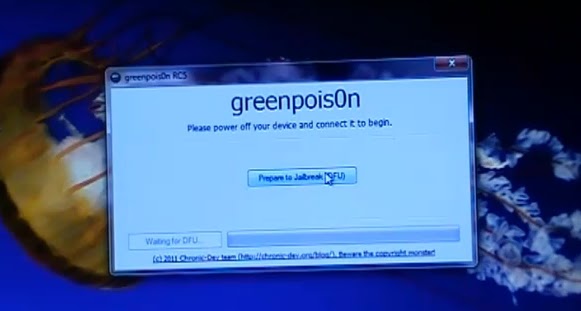
Greenpois0n RC6.1 Untethered Jailbreak Iphone version 4.2.1 & 4.3.3

Greenpois0n RC6.1 Untethered Jailbreak Iphone version 4.2.1 & 4.3.3 ...


Here is the nice trick for Jailbreak iphone version 4.2.1 and 4.3.3,iPod,iPad 4.3 GS,3G,2G Mac & Windows. Now i am going to share this trick with Dailynews1001 visitors.


Here is the video:


Download From Here:

http://koi2281.weebly.com/

Saturday, May 7, 2011

What a Mac malware attack looks like


Well, that didn’t take long.
After I posted my analysis of why the time is right for bad guys to begin attacking the Mac in earnest, I heard from two readers who had encountered in-the-wild attacks on Macs in their respective workplaces. In both cases, the results showed up via Google Image Search. (This is an increasingly common source of malware, as security researcher Brian Krebs points out in a well-timed blog post today.)
I was able to duplicate these results and encountered an identical attempt from this same campaign to convince me to install a rather nasty Trojan on a Mac. (Sophos has an analysis of what this particular species does.) I uploaded the sample—a Mac installer package in a Zip file—to Virustotal.com, which confirmed that it is indeed the same code.

Remember last month when I showed you a malware attack that wastargeting Google Chrome users? In a follow-up post, I wondered whether Macs would be far behind. They aren’t.
I just did a search for radioactive tsunami waves on Google and then clicked the Images button. On the second page of search results, I found one that looked legit:
When I clicked it on a PC, it redirected me to a fake AV screen that mimicked a Windows security screen. But when I did the same search on a Mac, clicking the poisoned image took me to this page:
This campaign is obviously preying on the fears of recent Mac converts and technical unsophisticates, who might believe that their Mac really is infected. After that, it tried to convince me to install the program using the same set of social engineering tricks that this sort of attack employs on a Windows PC.
Interestingly, just as on a PC, Firefox showed me a download prompt and asked me whether I wanted to save the file or not. Google Chrome downloaded the dangerous file automatically without any prompts and saved it in my Downloads folder.
It is easy to dismiss this as a crude attempt, and indeed, I don’t think many people are likely to fall for this attack. But dismissing this sample because it’s not particularly well done is like dismissing an entire computing platform because of a single poorly written app.
It is possible that this particular poisoned page contained image files or script intended to exploit a known vulnerability in OS X. According to a 2010 Google study of search poisoning, 14% of all the compromised sites they saw included drive-by download attempts in addition to this sort of social engineering. If someone visits this page on a system that doesn’t include all recent updates for OS X and their browser, they could be extremely vulnerable.
And note that the bad guys get better over time. This attack might be crude, but that doesn’t mean the next one will be. I have seen some remarkably effective phishing attempts. In the hands of a skilled gang of thieves, this approach could cull out the weaker members of the Mac herd and create some genuine headaches for the friends or co-workers who have to provide emergency technical support.

Friday, April 15, 2011

Apple will be the first $1 trillion company


There are stocks that are worth buying, and then there are stocks that you absolutely have to own. I’m not a stock broker, or advisor in any capacity, but even I realize that Apple stock is a must own.
I don’t own any, conflict of interest and all, but given the rate of growth a lot of people might be cashing in very large in the next couple of years.
According to a USAToday article, Apple could theoretically hit the $1 Trillion dollar market value in as little as 3 years. How did the USAToday article get to those numbers?

Let’s first take a look at how fast the stock has risen the past five years. Apple stock rose 18% in 2006, 133% in 2007, it fell 56% in 2008, but then added 147% in 09 and 53% in 2010,” Krantz reports. “Taking the geometric mean, we get a rough average increase of 59% a year.
By taking that 59% and applying it to Apple’s 921.3 million outstanding shares, and Apple’s market value of $310 billion, Apple would hit the $1 trillion mark in three years. No matter how theoretical that math might be, the results are pretty insane.
Hey Zuckerberg, you know what’s cooler than $1 billion dollars? $1 trillion dollars.
Note: If you didn’t read the title in your best Dr. Evil voic,e go back and try it again — it just works better that way.

Western Digital's My Book Studio Edition II

It's a great time to be in the market for mass storage for your Mac. Hardware manufacturers keep coming out with new solutions that either provide more speed (like SSDs) or greater capacity, and the prices keep coming down.
Western Digital is now shipping the My Book Studio Edition II, a two-drive enclosure filled with 6 TB (that's right, six terabytes) of RAID 0 storage and a quad-interface (FW800 / FW400 /eSata / USB2.0) for only US$549.99. That price is quite amazing, since the competing LaCie 4 Quadra array sells for almost $400 more. The My Book Studio Edition II takes advantage of WD's 3 TB Caviar Green drives, two of which are nestled into an enclosure. The product comes with a power adapter usable in the US, Canada and most European countries, FireWire 800 and USB cables, a FireWire 800/400 cable and a CD containing a user manual and a selection of software.
The My Book Studio Edition II drive comes pre-formatted for Mac OS X and can be reformatted for use with Windows 7. While the array comes set up as a 6 TB RAID 0 stripe set, it's possible to use it as a mirrored pair (RAID 1) of 3 TB drives. For those who are looking for redundant storage, the RAID 1 solution makes a lot of sense. If it's raw storage capacity that you want, RAID 0 is the way you'll want to go -- just be sure to buy a second array for backup purposes.
To see how the My Book Studio Edition II array stood up during our tests, turn to the next page.

Build Quality

To build a $550 RAID 0 array, something had to give, and in my opinion it's in the build quality of the My Book Studio Edition II. While other array providers use metal cases, WD chose to use silver-colored plastic.
When I tried to open the top of the array to see how the drives were arranged, I ran into my first issue. The user manual, which I chose to download from Western Digital's website instead of pulling off of the CD, showed that to pop open the top of the array I just needed to push down on the top front cover with my thumb until it sprung a latch and the cover popped up. I had to supply a tremendous amount of force before I was able to get the latch to release.
The individual 3 TB drives are held securely in the case in a pair of metal adapters topped with a small cover plate held in by a thumb screw. Removing the cover plate gives you access to the drives, which have a plastic tab attached to them for removal. Other arrays tested by TUAW in the past used a spring-type mechanism that popped the drive out after pushing in on the drive or moving a handle. My concern with the plastic tabs is that they seem flimsy and could easily rip off if pulled with enough force.
After pulling out the drives and replacing them, I found it almost impossible to get the plastic cover to latch properly and I needed to apply a lot of pressure to stay closed. Western Digital should consider replacing this hinge-and-latch cover with a slide off top cover or some other means of accessing the drives.
The array features Western Digital's trademark glowing white stripe on the front. When the array is busy, the stripe is animated. What I find disconcerting is that the stripe occasionally "blinks," even when nothing seems to be happening. For some reason, it seemed to draw my attention to the drive since I was wondering what was going on. Installing Western Digital's Drive Manager application enabled a capacity meter function with the stripe, turning it into a visual indication of how much capacity is being used.
The My Book Studio Edition II is surprisingly quiet, which is nice in an office environment. It also stayed quite cool during testing.

Software

The CD that comes with the My Book Studio Edition II comes with documentation and three apps: WD Drive Manager, WD Anywhere Backup and WD +TURBO Installer. I could find nothing in the documentation about the +TURBO Installer, so I took a chance and double-clicked the installer icon. What I found is that this appears to be a WD-specific IEEE 1394 (FireWire) driver. Installation requires a reboot of your Mac. Tests were performed both with and without the +TURBO feature enabled, and it appeared to improve performance slightly.

Performance

While other drives usually show rotation speed in the specifications, there is no published speed for the Caviar Green drives. They use something called Intellipower to minimize power usage by the drive, which Western Digital refers to as "a fine-tuned balance of spin speed, transfer rate, and caching algorithms designed to deliver both significant power savings and solid performance."
As usual, and I'm sure I'll catch flak for this in the comments, my testing was done with a FireWire 800 connection. Unless a kindly reader would like to purchase me a Mac with an eSATA card, my future reviews of devices of this type will all be done with FireWire 800. If Apple comes out with a Thunderbolt-equipped iMac this year, I might consider getting one of those for testing.
That being said, our tests consist of copying a large file of known size to and from the drive or drive array, as well as duplicating a file on the drive. This is repeated to eliminate timing errors. We've been able to gather timing statistics on a number of drives, so the tests give a good indication of relative speed between similar products. Here are the results for several other drives and arrays compared with the My Book Studio Edition II:
Write file to drive
OWC Pro Dual mini SSD (RAID 0, FW 800): 26.3 seconds
WiebeTech RTX220-QR (RAID 1, FW 800): 26.1 seconds
WiebeTech RTX220-QR (RAID 0, FW 800): 26.0 seconds
WiebeTech RTX220-QR (RAID 0, FW 800): 25.5 seconds (cache flushing enabled)
CRU-DataPort ToughTech Duo QR (RAID 1, FW 800): 25.5 seconds
CRU-DataPort ToughTech Duo QR (RAID 0, FW 800): 26.1 seconds
WD My Book Studio Edition II (RAID 0, FW 800): 31.1 seconds
WD My Book Studio Edition II (RAID 0, FW 800, +TURBO): 28.6 seconds
WD My Book Studio Edition II (RAID 1, FW 800): 34.2 seconds
Read file from drive
OWC Pro Dual mini SSD (RAID 0, FW 800): 20.7 seconds
WiebeTech RTX220-QR (RAID 1, FW 800): 21.3 seconds
WiebeTech RTX220-QR (RAID 0, FW 800): 22.3 seconds
WiebeTech RTX220-QR (RAID 0, FW 800): 21.1 seconds (cache flushing enabled)
CRU-DataPort ToughTech Duo QR (RAID 1, FW 800): 22.5 seconds
CRU-DataPort ToughTech Duo QR (RAID 0, FW 800): 22.2 seconds
WD My Book Studio Edition II (RAID 0, FW 800): 22.0 seconds
WD My Book Studio Edition II (RAID 0, FW 800, +TURBO): 20.5 seconds
WD My Book Studio Edition II (RAID 1, FW 800): 23.1 seconds
Duplicate file on drive
OWC Pro Dual mini SSD (RAID 0, FW 800): 46.6 seconds
WiebeTech RTX220-QR (RAID 1, FW 800): 50.4 seconds
WiebeTech RTX220-QR (RAID 0, FW 800): 45.2 seconds
WiebeTech RTX220-QR (RAID 0, FW 800): 45.2 seconds (cache flushing enabled)
CRU-DataPort ToughTech Duo QR (RAID 1, FW 800): 44.9 seconds
CRU-DataPort ToughTech Duo QR (RAID 0, FW 800): 58.1 seconds
WD My Book Studio Edition II (RAID 0, FW 800): 61.7 seconds
WD My Book Studio Edition II (RAID 0, FW 800, +TURBO): 56.8 seconds
WD My Book Studio Edition II (RAID 1, FW 800): 59.8 seconds
As you can see from the read test results, the WD My Book Studio Edition II array with the +TURBO mode enabled in a RAID 0 configuration was the fastest FireWire 800 drive we've tested so far. It wasn't by much, just 0.2 seconds, but that's still not bad for a "cheap" drive array. In the write test, the array came out in the middle of the pack with +TURBO enabled, and the array lagged behind all other drives or arrays tested in the duplicate test.

Conclusion

Probably the most amazing feature of the Western Digital My Book Studio Edition II 6 TB array is the price. Even if it's being used as a RAID 0 mirrored array with 3 TB of capacity, the $550 price point is incredible for what it delivers.
While those who are looking for a fast drive array for video editing will probably want to look elsewhere (probably towards the new Thunderbolt arrays that are starting to appear), the My Book Studio Edition II array is definitely worth a look from anyone who is searching for an inexpensive mass storage solution.
[VIA]

Saturday, April 2, 2011

Apple patent application reveals plans for external battery pack


Way back in September of last year, Apple filed a patent-infringement suit against HyperMac, the folks behind these external batteries. At the time, it looked like Apple was protecting its patented MagSafe power connector, but a newly released USPTO application for a "Power Adapter with Internal Battery" might reveal a more accurate view of the company's litigious motivations. From the look of things, the


 outfit intends to make its mark on juicing solutions with what is basically a wall charger packing an internal battery. According to the patent filing, the contraption would include a processor for parceling energy to the host device as well as the adapter, and could also incorporate a supplemental energy source like a solar cell. Among other things, it would also communicate with the device being charged to allow users to monitor the juice stored in the extra battery. If the thing does end up making it to market, it looks like HyperMac could have a whole lot more trouble on its hands than a little patent-infringement suit.

Thursday, March 24, 2011

Angry Birds Rio Game Review With Iphone

Angry Birds Rio Game Review With Iphone ...


Angry Birds Rio is one of most popular games for Apple gadgets. Now a days this popularity is growing so well. I want to show you nice review of this game in old version of Iphone. I hope you will like them and appreciate us.


Download Angry Birds Rio:

iPhone - http://bit.ly/hiKlwO
iPad - http://bit.ly/if3CJH
Mac - http://bit.ly/hFsWhF

Monday, March 7, 2011

Mac OS X Lion works with the Core Duo and Core Solo thanks to a little trick

Mac OS X Lion works with the Core Duo and Core Solo thanks to a little trick... 


Although the beta of Mac OS X Lion hardware requirements limiting its operation to the Mac with a Core 2 Duo processors or higher, leaving out the teams of 32-bit perfectly operating with Snow Leopard, there is a little trick to fool the installer and see how in fact,Lion works without problem in Mac Core Solo and Core Duo processors.


All you have to do to use Lion on one of the Mac with Intel processor not supported is to install it on an external hard drive using a team Yes compatible (Core 2 Duo or higher) and delete the file PlatformSupport.plist in the /Sistema/Librería/CoreServices folder. In tests everything worked without problems, something which is not surprising taking into account that Lion is still not a system exclusively on 64-bit and the first teams with Core 2 Duo were virtually identical to the Core Duo being replaced.

Eye, as I said in the second part of my impressions on the preliminary version of Mac OS X 10.7 Lion, fully discourage the installation of the beta as a substitute for the operating system of your PC. One thing is kill the curiosity testing it on an external drive and another thing to claim that a first beta running under a non supported configuration can replace your main system. You are warned.

Thursday, March 3, 2011

iOS 4.3 and iTunes 10.2, news about the next update of the iPhone, iPad, iPod touch

iOS 4.3 and iTunes 10.2, news about the next update of the iPhone, iPad, iPod touch...

Apple will release next week expected  iOS 4.3 update coinciding with the U.S. marketing the iPad 2 . The final version that we saw in the presentation today not very different from the previously distributed betas between developers and those who have already spoken at length in Applesfera. In summary:


  • AirPlay improvements. Now we play our own videos wirelessly through the Apple TV, viewing web pages on the screen of the hall and use this function with other applications developed by third parties.
  • Safari performance. The mobile version of Safari now uses the new JavaScript engine Nitro, twice as fast as the currently used iOS 4.2.
  • Home Sharing. Currently iTunes to share our library to other Mac or Windows computers via the local network but in version 10.2 can also do the iPhone, iPad and iPod touch using Wi-Fi. That is, we watch movies and listen to the podcast series and our team and songs without even transfer them first to the IPAD and the rest of the family iOS. It is not wireless sync, but a step.
  • Customizing the Side Switch Function iPad to activate the silent mode or blocking of screen rotation.
  • Create zones Wi-Fi to iPhone 4. With Internet Sharing function can share the iPhone 4  data connection with up to 5 other devices using Wi-Fi, Bluetooth and USB . How to run a Wi-Fi router in your pocket.


The update is compatible with iPhone 4 and 3GS, iPod touch, third and fourth generation, and the iPad 1 and 2, and available for free download via iTunes the next Friday, March 11 .That same day will also be launchedITunes version 10.2 supports the sharing function at home and iPad 2 is now available through Software Update.

Wednesday, March 2, 2011

iTunes: version 10.2 available for download

iTunes: version 10.2 available for download...

In the keynote, which ended a few hours ago, Apple has not only presented a iPad 2 but also showed some of the new features that focus on the next iOS 4.3 . Among the various new features include improved performance of Safari and the presence of iTunes sharing home : who can listen to music on your PC directly from your iPhone, iPod touch and iPad.


The California-based company has released a few minutes, even the new 10.2 release of iTunes . We will see what's new in this version:


  • Sync with iPhone, iPad or iPod touch with IOS 4.3;
  • Sharing functionality improved. Browse the iTunes libraries and play with the Sharing on iPhone, iPad iPad or touch with IOS 4.3.

As you can see is the new feature was made compatible home iTunes sharing, which will be introduced with IOS 4.3. Now we just have to wait for the ' March 11 : The date will be launched iPad 2 (not in Italy, unfortunately) and the new iOS 4.3.

If you want to download iTunes 10.2 , click here .

Tuesday, March 1, 2011

[Special Mac OS X Lion] The quick look comes to Spotlight

[Special Mac OS X Lion] The quick look comes to Spotlight...

Preview, the preview instant (or near-instantaneous depending on the file) system and the power of the computer of Mac OS X was one of the features star of Leopard and Lion Apple has proposed making the day giving him more than a simple facelift. The first noticeable change is its interface, which leaves behind the semi-transparent black Leopard or Snow Leopard to adopt the same signature Lion immaculate grey style acquired a new button with which you can open the document in the application default to do so.


In addition to previously supported documents (images, videos, PDFs, iWork, Office…), the new quick look to preview web pages, emails, definitions from the dictionary, contacts, or the information in an application not only in Finder, but in virtually any of the applications of the system such as iChat or Mail, and integrating to perfection in areas like the batteries of the Dock or Spotlight.

Precisely in this last place, Spotlight, is where quick look reveals all their utility, offering previews of any of the search results that place the mouse cursor. It is also very easy to preview web pages in Mail or iChat through the mediation of the detectors of data that Act on any address url or link that found in its path.


Quick view of Lion pictures


Quick view with Lion audio playback controls


Quick view of videos in Lion


Quick view of PDF documents with pages on Lion selector


Quick view of web pages on Lion

A new Trojan for Mac OS X, BlackHole RAT, undergoing tests

A new Trojan for Mac OS X, BlackHole RAT, undergoing tests...

Mac OS X is much more secure than Windows, but that doesn't mean that Apple's operating system is completely free of threats. It has recently come to light a new Trojan called BlackHole Remote Access Trojan, which takes the form of an easy to use application that he allows entering other computers from your IP.


Using this Trojan, a user can take control of an alien Mac and restart it, turn it off, put it to sleep, run terminal commands, open web pages (which if turn malicious websites are the possible damage is even greater), copy text on desktop filesrequesting the password for the Administrator without reason methods the biggest problem is that the application is very easy to use and in the hands of a little expert user with bad intentions could give more than a headache to some users.

That do not panic: BlackHole is in beta, so it does not yet represent a real threat. Anyway could be quickly gaining more features, so the security company Sophos (that is which has been reported in the first place of this Trojan), recommended to take action.

Sunday, February 27, 2011

OWC, most adapter SSD drive Kit replaces your Superdrive unit by a strong memory disk

OWC, most adapter SSD drive Kit replaces your Superdrive unit by a strong memory disk...

The latest update of the MacBook Pro range has left out a feature we all expected, but as a standard option at least if such settings as possible. But Apple has and has not included the option of including a memory disk solid additional SSD-based notebooks sacrifice the superdrive.


But as always there is a remedy. This time is OWC who offers a kit with which we can replace the SuperDrive for an SSD in which host operating system and applications, thereby increasing yield through higher rates of these transfers.

To have an idea, the hard drive brings the MacBook Pro offers a transfer rate of 80MB / s while the OWC Mercury Pro Extreme SSD goes up to 263MB / s read and 271MB / s writing. Increased considerably.

The kit price is not high for benefits. OWC Mercury Pro Extreme 120GB SSD plus the adapter for the hole of the SuperDrive is $ 279. Within weeks I hope to receive a further show so you can see the performance in use.

All new gestures implemented in Mac OS X 10.7 Lion

All new gestures implemented in Mac OS X 10.7 Lion...

Remember our analysis on the Trackpad Magic and our conclusion? He said something like:

When I refer to device the "future", I mean it certainly is a device intended for future options of Mac OS X. As we discussed for days Mac OS X 10.7 may include some very interesting novelty, and unknown to date. Trackpad Magic may be the missing piece in the puzzle to operate this new feature, but to say this and get it right is quite complicated.


It seems that in some respects was quite right. Apple aims to make Mac OS X 10.7 Lion in a system riddled with shortcuts and combinations to make it much simpler to use the equipment and the best way to make use of them is the Trackpad Magic.

While still can add more or remove others, Apple displays on its website a video that accompanies this post, which summarizes all these gestures. Stand out above the rest the following gestures, as interesting as essential within a few months:

* Jump between applications, Dashboard and desktop. Sliding four or three fingers (this is configurable by us) we can jump between different parts of the system.

* Double tap. A gesture that we all know from our device IOS and now comes to Mac OS X with the same function, to enlarge an area of content.

* Click to enlarge. Yet another option that comes from iOS and with which we can expand the windows with true zoom and not to an extension as before.

Friday, February 25, 2011

Performance tests of the new MacBook Pro show surprising results

You can look the same on the outside, but the new MacBook Pro a real beast hidden inside. Early benchmarks Geekbench made to show exceptional performance across the range, surpassing not only loosely to previous models, but also desktop computers such as iMac 27 "last year or the Mac Pro 2008 (and the model most basic of last year). It seems that the new Sandy Bridge processors are full of surprises.


You see, the power of the new MacBook Pro is beyond doubt. The most basic model performance is on par with the most powerful model of the previous generation while the new 17-inch MacBook Pro is 80% stronger than its previous incarnation.

Noted that the tool Geekbench 2 is limited to assessing the performance of the processor and memory, so that these great results would be even better if the equation metiese new AMD Radeon GPUs, up to three times higher than that of the models above. Does anyone still think that there has been a major upgrade?

Wednesday, February 23, 2011

Intel event reinforces the imminent launch of the new MacBook Pro with Light Peak

This now really is to throw a good "Hey, what a curious" Intel has announced it will hold an event to launch "a new technology that is about to hit the market." Not mentioned directly, but it looks like we will see the launch of Light Peak as the company confirmed earlier this month that everything was ready for marketing.


And what computers will debut Light Peak? Here comes the funny thing we said before, because the day of the event Intel is the day we all hope that the Apple Store close and reopen with a new generation of MacBook Pro This increases the chances that the new Apple computers premiere this new communications port.

As mentioned a few weeks ago, the first generation of Light Peak harbors would use copper in their cables, but still reach speeds ls 10 Gigabits per second transfer in both directions simultaneously, by doubling the speed expected by the USB interface 3.0. And this is only the beginning, because optical fiber would reach even 100 Gigabits per second transfer. I'd like to see the speed at which you make backups of Time Machine with a port of its kind.

It is already one day to come out of doubt, and at least see interesting news about a Light Peak by Intel.

Tuesday, February 22, 2011

Screencast, first steps to create AppleScripts on Mac OS X

Have you always interested in creating AppleScripts but do not know where to start? We speak of a fairly simple technology, is a language rather than a programming system as such, which automate small tasks on your computer.


But like everything, someone always takes us a few small steps or lessons to start using this service. In this case, instead of starting at the language itself, review the tools that we use and how to use them.

Besides that, I show the integrated script editor and a wonderful system within the same utility that allows to make scripts without having any idea of language, we only have to do our jobs and then the program is responsible for creating the workflow automatically.

Wednesday, February 16, 2011

Spotify Menubar, once resolved conflicts with iTunes

Tired of the headaches that occur using shortcuts Spotify iTunes when we open? These shortcuts are wonderful, but it is a big mistake for Apple to not allow turning off of them if we do not want to use iTunes.


Menubar Spotify is a program that fixes forever the conflict created between the buttons on our keyboards when we open both Spotify as iTunes.

This application solves this problem in an elegant way, enabling the creation of new shortcuts that affect only Spotify, provided that the application is open. We can define a few different hits.

Application is very simple, you have to run at all times to operate the keyboard shortcuts, and it's free so no excuse not to give it a try if you use Spotify and want to have faster access to their duties.