Friday, April 10, 2009

Windows 7 Build 7077 x64 Leaked

Windows 7 LogoThe time between various Windows 7 build leakage is getting narrowed day by day. Every now and then we see Windows 7 Build getting leaked. Now two days back we had reported about windows 7 build 7077 x86 getting leaked on torrent websites and here is news of Windows 7 build 7077 x64 leaked on Russian torrent website.

Interestingly the size of Windows 7 Build 7077 x64 is larger than previously leaked all Windows 7 x64 builds, its 3.04GB. Windows 7 Build 7077 x64 is leaked as ISO DVD.

Windows 7 Build 7077 x64 details

File name:- 7077.0.090404-1255_x64fre_client_en-us_Retail_Ultimate-GRC1CULXFRER_EN_DVD.iso

Size:- 3.04GB

MD5=9a5e6cdb8d4d42f528a7053f810a4765

HA1=508afefec802613e6a3346f8d766793a562147ff
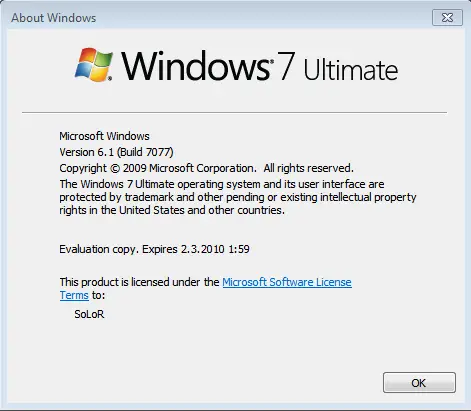
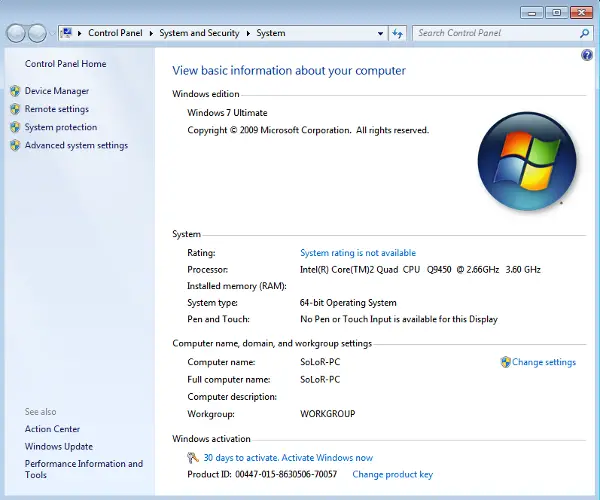
Screenshots of Windows 7 Build 7077 x64 (64-bit)

Windows 7 Build 7077 x64

Windows 7 Build 7077 x64 System info

Download Windows 7 Build 7077 x64

Check out jcxp forums for more details or search in google or check out popular torrent

Wednesday, April 8, 2009

Download Ubuntu Customization Pack for Windows XP

Ubuntu is one of most popular Linux flavor which is popular for its simplicity, amazing style, themes, icons and look & feel. If you ever wanted to have Ubuntu like look and feel for your Windows XP then here is Ubuntu Customization Pack for Windows Xp.
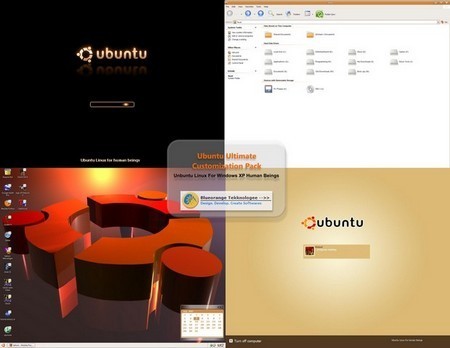
Ubuntu Customization Pack contains the visual styles for Ubuntu, Cursors, Boot Screen, LogonUI, Screensaver, custom sounds and much more utilities for Ubuntu feel on your windows X. Ubuntu Customization Pack will completely transform your Window XP to Linux Ubuntu.

Screenshot of Ubuntu Customization Pack for Windows XP

Ubuntu Customization Pack for Windows XP.

Download Ubuntu Customization Pack for Windows XP (Rapidshare Link).

60 Best Ubuntu / Gnome Themes [Download linux themes]

Monday, April 6, 2009

Ubuntu 9.04 Jaunty Jackalope Brand New Wallpapers

Ubuntu 9.04 Jaunty Jackalope Logo

We all are aware of latest Ubuntu release under development is Ubuntu 9.04 named Jaunty Jackalope. Ubuntu 9.04 is tenth release of the Ubuntu operating system and final release is scheduled for April 23rd.

Every new Ubuntu release gets its new wallpapers from Ubuntu Art Work team and here is set of brand new wallpapers designed for Ubuntu 9.04 Jaunty Jackalope. The brand new wallpapers of Ubuntu 9.04 Jaunty Jackalope are updated for Ubuntu 8.10 Intrepid Ibex and available for download.

Ubuntu 9.04 Jaunty Jackalope Wallpapers

Ubuntu 9.04 Jaunty Jackalope New Wallpaper

(Download)

Ubuntu 9.04 Jaunty Jackalope New Wallpaper

(Download)

Surprisingly above Ubuntu 9.04 brand new wallpapers doesn’t have tradition Ubuntu Logo.

Ubuntu 9.04 Wallpapers submitted at Artwork

Ubuntu 9.04 Jaunty Jackalope New Wallpaper

Ubuntu 9.04 Jaunty Jackalope New Wallpaper

Ubuntu 9.04 Jaunty Jackalope New Wallpaper

Download Ubuntu 9.04 Jaunty Jackalope Wallpapers submitted at Artwork

Source: Softpedia

Access Linux Ext2 & Ext3 Volumes Directly From Windows using Ext2 Installable File System for Windows

Linux Logo

Most of the Geek users prefer to have dual boot system with Linux and Windows OS installed on same hard drive. Since Linux requires different file-system type then windows the volume is normally Linux formatted. This Linux Formatted partition cannot be access directly from Windows.

There may be instances when you are working on Windows and need to access Linux drive for some files and switching from windows to Linux is the only way but it could be time consuming. How about if we can directly access Linux Ext2 and Ext3 volumes from Windows, Don’t you think it will be great savior for us? Well then here is freeware application Ext2 Installable File System for Windows (Ext2 IFS for windows).

Ext2 IFS for Windows gives full access (read access and write access) to Linux Ext2 & Ext3 Volumes. Ext2 IFS installs a pure kernel mode file system driver Ext2fs.sys, which actually extends the Windows operating system to include the Ext2 file system thus enabling all applications to directly access Ex2 Linux volumes without need of any other extra work.

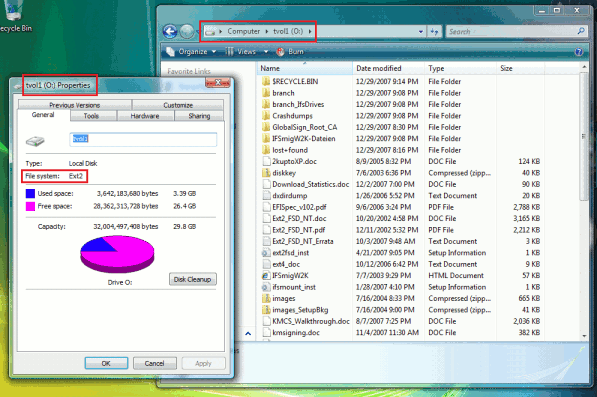
Once you have installed Ext2 IFS for Windows all your Linux Ext2 & Ext3 volumes will appear in your My Computer as Local Drive like your other FAT32 and NTFS drives.

Screenshot of Ext2 Installable File System for Windows

Access Ext2 & Ext3 Linux Volumes from Windows with Ext2 IFS

Supported Operating System: - Windows NT4.0/2000/XP/2003/Vista/2008

Download Freeware Ext2 Installable File System for Windows and instantly access Linux Ext2 & Ext3 Volumes directly from Windows.

Download Apple iTunes 8.1.1 For Windows and Mac

Apple iTunes 8.1.1 LogoIts not long ago when apple had released iTunes 8.1 with new features like iTunes DJ and with many other enhancements. Today once again apple has updated its popular software iTunes 8.1 to 8.1.1. iTunes 8.1.1 adds support for renting HD movies and provides a number of bug fixes, including addressing issues with VoiceOver and syncing with iPhone or iPod touch.

Apple iTunes 8.1.1 is available for download for Windows and Mac. below is features list of iTunes 8.1.1.

Features of Apple iTunes 8.1.1 for Mac and Windows

1. Supports syncing with iPod shuffle (3rd generation)

2. Allows friends to request songs for iTunes DJ

3. Adds Genius sidebar for your Movies and TV Shows

4. Improves performance when downloading iTunes Plus songs

5. Provides AutoFill for manually managed iPods

6. Allows CDs to be imported at the same sound quality as iTunes Plus

7. Includes many accessibility improvements

8. Allows iTunes U and the iTunes Store to be disabled separately using Parental Controls

Apple iTunes 8.1.1

Download Apple iTunes 8.1.1

Download Apple iTunes 8.1.1 For Mac

Download Apple iTunes 8.1.1 For Windows

Download Blackberry Video Converter for Free

BlackBerry Mobile Phone Video ConverterOften Mobile phones have their own proprietary video format and set of some other video formats which only they support and in order to play videos of different format on your mobile phone you need to first convert such video files to supported format and then play on your mobile.
For example Blackberry phones like Blackberry Bold, Blackberry Storm, Blackberry flip etc only supports video files with 3gp format. If you are looking for freeware tool to convert videos to blackberry supported formats then here is freeware Agogo BlackBerry Video Converter.

Agogo BlackBerry Video Converter is an ideal program for anyone. It enables you convert almost all kinds of video files such as rm, divx, xvid, avi, wmv, asf, mpg, mpeg, vob, mov, qt, mp4, 3gp, swf, nsv to 3gp video.

Agogo BlackBerry Video Converter

1. Simple and easy to use,customize the quality of output video.

2. Support wmv , asf ,mov , qt to cellphone 3gp.

3. Support rm , rmvb,mpg , mpeg , vob ,vcd , svcd to cellphone 3gp.

4. Support avi , divx , xvid ,swf , nsv to cellphone 3gp.

5. Automatically shutdown your computer after long time conversion, such as for big files conversion at midnight.

Screenshot of Agogo BlackBerry Video Converter

Agogo BlackBerry Video Converter

Supported Operating system:- Windows 95/ 98/ Me / XP / 2000 / 2003 Server / Vista

Download file size:- 4Mb

Download Agogo BlackBerry Video Converter

Saturday, April 4, 2009

Unofficial QuickPWN 3.0 Beta 2 to Jailbreak iPhone OS 3.0 Released

QuickPWN 3.0 Jailbreak iPhone 3.0

The main reason of iPhone dev team being very confident on jailbreak is, the exploit which has been used for jailbreaking is found to be hardware level bug which can’t patched just by software update.

Here is surprise from iPhone dev team, they have already successfully jailbroken firmware 3.0 beta but they purposely didn’t release jailbreak tool for following reason.

1. iPhone dev team don’t want to release QuickPWN and Pwnage tool for every single beta release of firmware 3.0

2. Even after jailbreaking firmware 3.0 its still not possible for yellowsn0w to unlock latest baseband and is still only compatible with baseband 02.28.00

3. To stop apple for fixing any bugs used to jailbreak.

Jailbreak iPhone & iPod Touch Firmware 3.0

If you have upgraded your iPhone 3G to firmware 3.0 then you need to wait for official QuickPWN and Pwnage Tool from iPhone Dev team.

Well don’t worry if you can’t wait then here is unofficial version of QuickPWN 3.0 Beta 2. This is an unofficial release and it’s not created by the iPhone Dev Team.

The Russian hacker Vortex has once again released an unofficial jailbreak at iPhoneApps.ru. Using QuickPWN 3.0 beta 2 you can only jailbreak

1. iPhone 3.0 Beta 2,

2. iPhone 3G 3.0 beta 2,

3. iPod Touch 1st Generation beta 3.0.

QuickPWN 3.0 to Jailbreak iPhone 3G Firmware 3.0.

Download QuickPWN 3.0 Beta 2

Download QuickPWN 3.0 beta 2